How to Track Your Car Maintenance on iPhone
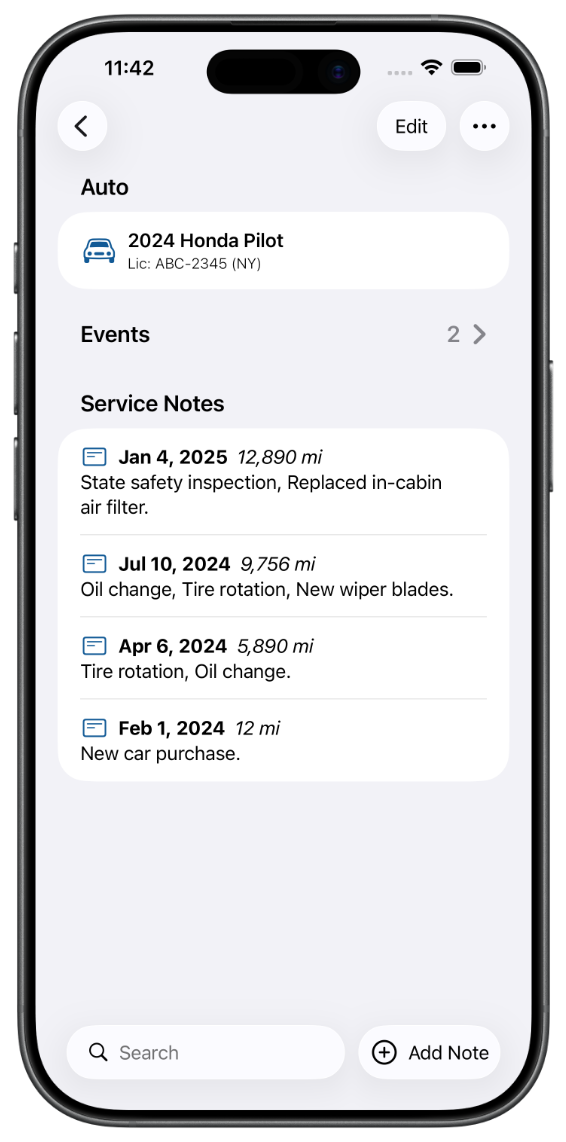
Most people have no system for tracking car maintenance. Oil change intervals get fuzzy. Tire rotation dates blur together. You find yourself at the shop wondering if you’ve already had that service done. It’s a small problem that turns into an expensive one.
Here’s how to fix it on your iPhone, for free.
What You Should Be Tracking
A basic maintenance log covers the services that matter most for keeping your car reliable and holding its value:
- Oil and filter changes
- Tire rotations
- Brake pad and fluid checks
- Battery replacement
- Air filter changes
- Scheduled inspections
Most people skip logging these because there’s no easy place to put the information. A notes app works until it doesn’t. A spreadsheet is overkill. A paper log lives in your glovebox until it doesn’t.
A dedicated app solves this.
Using Auto Care Plus to Track Everything
Auto Care Plus is an iPhone app built specifically for this. You add your vehicle, log services as you go, and set reminders so nothing slips through.
Here’s what the basic flow looks like:
- Add your vehicle. Name it, add your license plate, and you’re set.
- Log a service. Tap the Add Note button, or use the Add Service Note menu item, and fill in the date, mileage, and any notes. Takes about 30 seconds. As of version 1.6.0 you can also do this by voice, covered in How to Log Car Maintenance With Siri on Your iPhone.
- Set a reminder. Pick a due date and the app will notify you when it’s time. There’s a step by step walkthrough in How to Set Oil Change and Car Maintenance Reminders on Your iPhone.
That’s the core of it. Everything you’ve done is in one place, searchable, and yours.
A Few Features Worth Knowing About
NHTSA recall lookup. Auto Care Plus can check your vehicle’s open safety recalls from inside the app. Most people don’t know this database exists, let alone how to check it. It’s worth doing, and there’s a full walkthrough in How to Check If Your Car Has an Open Recall on Your iPhone.
iCloud sync. Your records sync across all your Apple devices automatically. Add a service on your iPhone and it’s there on your iPad. There’s more on why this matters in Why iCloud Sync Matters for a Maintenance Tracker.
Unlimited vehicles. If you manage more than one car, you can add as many as you need. Separate garages, separate logs. There’s a full walkthrough for households and fleets in How to Keep Maintenance Records for Multiple Cars on Your iPhone.
Collaboration. You can share a vehicle with another user, like a spouse or family member. Both of you can add and edit service records, and you each see the other’s changes automatically. Useful when more than one person is responsible for the same car.
Export your data. Your records are yours. You can export and import everything, so you’re never locked in.
Why Bother?
Two reasons. First, it saves money. Knowing your service history helps you avoid paying for work you’ve already done and catch problems before they turn into major repairs. Second, it adds up when you sell. A documented service history is a genuine selling point for a used car, and there’s more on exactly which records buyers want in What Maintenance Records Do I Need to Sell a Car?.
Logging a service takes less than a minute. There’s no reason not to.
Download Auto Care Plus on the App Store
