How to Set Oil Change and Car Maintenance Reminders on Your iPhone
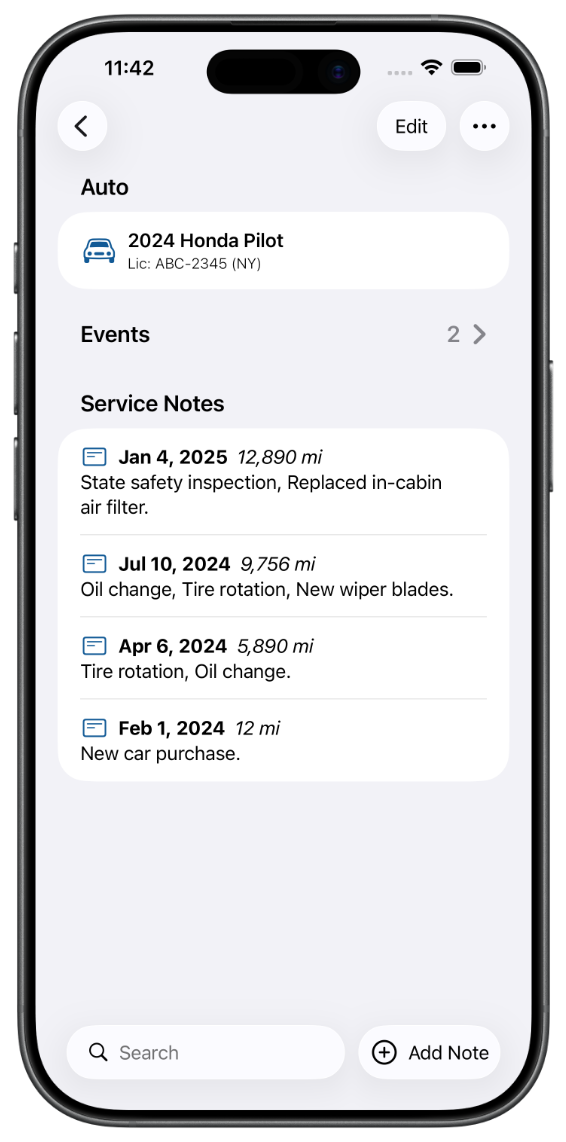
To set car maintenance reminders on your iPhone, log a service like an oil change, set the date it is next due, and let a maintenance app notify you before that date arrives. You can do this with the built in reminders in Auto Care Plus, which ties each reminder to the actual service you logged, so the alert knows what it is for and which auto it belongs to.
Here is the problem that makes reminders worth setting at all. Almost nobody can tell you, off the top of their head, how many miles ago their last oil change was or when the tires are due to rotate. The date lives on a windshield sticker you stopped reading months ago, or in your memory, which is exactly where these things go to get lost. So the service slips, then slips again, and one day you are either overdue or paying for work you were not sure you needed.
Why a reminder in your head does not work
It is not a discipline problem. Car maintenance is spread out over months, and the intervals are all different: oil on one schedule, tires on another, brakes and inspections on their own timelines, one set for each auto in the driveway. That is far too much for anyone to hold in their head, and a sticky note on the dash does not survive a car wash. The reminder has to live somewhere that pings you at the right moment, on the device you already carry.
How to set a car maintenance reminder on your iPhone
The whole point is to set it once and stop thinking about it. In Auto Care Plus the steps are short:
- Add your auto. Enter the vehicle once so every service and reminder has a home.
- Log the service. Record the oil change, tire rotation, or repair with the date and the mileage. The mileage matters as much as the date, since a due date only tells you half the story: How to Track Car Mileage Between Oil Changes on Your iPhone.
- Set the due date. Pick when the next one is due, and the app notifies you before that date arrives, so you get a heads up instead of a surprise.
That is it. You do the work once, at the moment you actually have the details in front of you, and the reminder handles the follow up weeks or months later.
Tie the reminder to the record, not to a blank alarm
You could set a plain calendar alarm that says “oil change,” but three months from now that alert is just a word with no context: which auto, at what mileage, based on which last service. A reminder that is attached to the logged service carries all of that with it. When the notification arrives, you can open it and see the full history for that vehicle, so you know whether it is really due or whether you already handled it. The reminder and the record are the same thing, which is the difference between a nagging alarm and a system you trust.
Since version 1.9.0 a dated event can also go to your calendar, so the date sits in the week you are already planning while the full record stays in the app: How to Add Car Maintenance Dates to Your iPhone Calendar.
Because the app syncs through your own iCloud, the reminders and history follow you across your iPhone, iPad, and Mac, so setting a reminder on one device means it is waiting for you on the others too.
What to set reminders for
Oil changes are the obvious one, but the same approach works for everything on a schedule: tire rotations, brake checks, air filters, state inspections, registration renewals, and any recurring service your auto needs. If it has a due date, it can have a reminder. And while you are keeping the vehicle current, it is worth a quick recall check too, which I cover in How to Check If Your Car Has an Open Recall on Your iPhone.
Since version 1.6.0 you can also log the service and set the next one by voice, without opening the app at all, which is covered in How to Log Car Maintenance With Siri on Your iPhone.
If you are setting all of this up from scratch, the fuller walkthrough is in How to Track Your Car Maintenance on iPhone. And if there is more than one auto in the driveway, each on its own schedule, see How to Keep Maintenance Records for Multiple Cars on Your iPhone.
What it costs
Auto Care Plus comes with a 30 day free trial on a subscription, then $1.99 a month or $7.99 a year. There is also lifetime access for $24.99, a one time purchase with no trial, so you pay once and the app is yours. Every plan includes the reminders, the recall check, and the iCloud sync described above.
The takeaway
To set oil change and maintenance reminders on your iPhone, log the service with its date and mileage, set the next due date, and let the app notify you before it arrives. The owners who never miss an oil change are not the ones with better memories. They are the ones who wrote it down once and let a reminder do the remembering.
Download Auto Care Plus on the App Store
