How to Track Car Mileage Between Oil Changes on Your iPhone
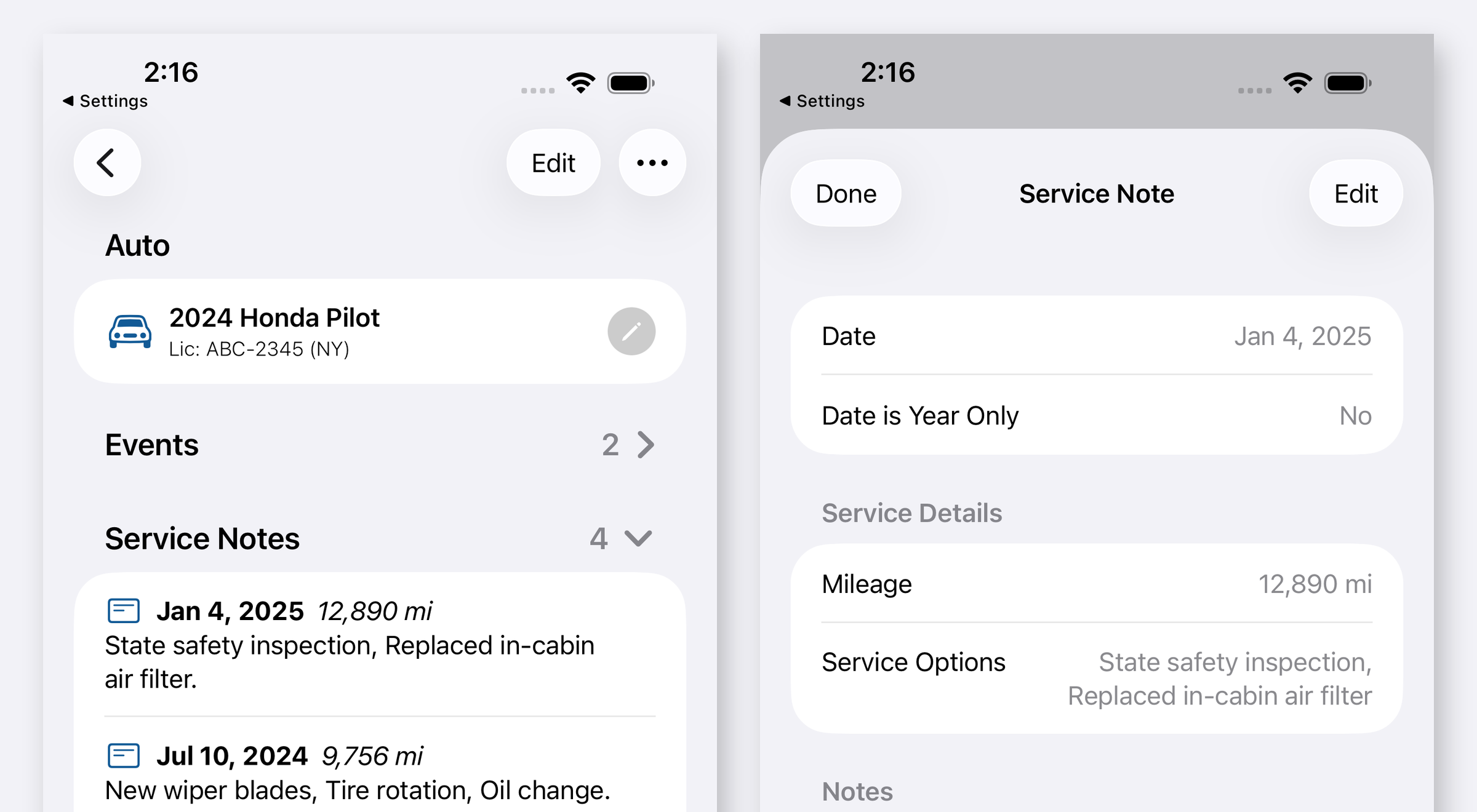
To know how many miles you have driven since your last oil change you need two numbers: the odometer reading on the day of that oil change, and the reading today. Your dashboard only gives you the second one. Auto Care Plus keeps the first one for you, because every service you log carries the mileage along with the date, so the reading gets written down at the one moment you actually know it and is waiting there the next time you need it.
An odometer is a running total and a maintenance interval is a difference. The dash says 84,312 and it has said something close to that for years. Nothing on the auto tells you whether the last oil change happened at 79,000 or at 81,500, and those two answers sit three thousand miles apart, which is the difference between overdue today and due next spring. So most people fall back on the sticker in the corner of the windshield, and that sticker is a guess written by a shop that has no idea how you drive.
Why the sticker and your memory both fail
- The sticker fades, peels, or belongs to the previous owner. On a used auto it is often the only record you inherit, and it is worth nothing.
- The shop’s guess is a fixed number. It does not know that you did 900 miles this winter and 6,000 in July.
- Your memory keeps the season, not the number. You remember it was sometime after the trip. You do not remember 81,447.
- The receipt has the reading and the receipt is gone. It went out with the glovebox clearout, or it stayed with the shop that closed, and the shop you use now has no record of it either.
The reading is only knowable at one moment: while you are standing next to the auto with the work just done. Miss that moment and the number is gone for good.
How to track the miles between services on your iPhone
- Add the auto. Type or paste the VIN and the year, make, model, series, and trim fill themselves in, with a chance to check the result before anything is saved. Entering the details by hand is still one tap away.
- Log the oil change with the reading. A service note takes the date, the mileage, and any notes you want, so the record says what was done, when, and at what number. Kilometers are saved and shown exactly as you entered them if that is how your auto counts.
- Set the next one due. The reminder attaches to the service you just logged, so when it arrives you can open it and see the full history rather than a bare alarm that says “oil change” with no context.
- Add the reading whenever you happen to see it. You do not have to wait for a service. Log the mileage at a fill up or at the start of a trip and you build a record of how fast this particular auto accumulates miles.
- Check it before you book anything. Open the auto and the last logged reading is there next to the date, so you can subtract from what the dash shows this morning and decide whether the appointment is needed yet.
How many miles should you actually go between oil changes
The honest answer is that your owner’s manual outranks anything on the internet, including this post. That said, the current numbers look roughly like this:
- Full synthetic: most modern autos are rated for 7,500 to 10,000 miles, and a lot of manufacturers now publish 10,000 miles or 12 months, whichever comes first.
- Conventional oil: 5,000 to 7,500 miles is the usual range.
- Severe use shortens all of it. Short trips, towing, heavy dust, extreme cold, and a lot of idling are the common causes.
- Newer autos often do the math for you. Oil life monitors watch engine temperature, revolutions, running time, and trip length, then tell you when the oil is genuinely spent rather than when a fixed number is reached.
The 3,000 mile rule most of us grew up with is a leftover from conventional oil in older engines. Following it on a modern auto mostly buys you extra oil changes.
Miles and months are two separate clocks
Reminders in Auto Care Plus run on dates, because a date is the thing a phone can actually watch for you. The mileage log is how you find out whether that date is early or late.
Drive 3,000 miles in a year and the calendar came due first, so the oil goes anyway even though the number looks low. Drive 14,000 and the miles came due months before the date did, and a reminder on its own would have let you run long. The service is due when either clock arrives, and keeping the readings is how you know which one got there.
For the reminder side of this, How to Set Oil Change and Car Maintenance Reminders on Your iPhone covers the setup. If you are starting from nothing at all, How to Track Your Car Maintenance on iPhone walks through the first entry. And once you have picked a due date, it can sit in your calendar rather than only in the app: How to Add Car Maintenance Dates to Your iPhone Calendar.
Logging the number without stopping to type
The reading is easiest to capture at the pump or in the shop parking lot, which is exactly where nobody wants to unlock a phone and fill in a form. Auto Care Plus publishes its actions to Siri, Spotlight, and Shortcuts, so Log Mileage and Get Mileage work by voice or from a search field without opening the app. Ask for the mileage, say the number, done. The full set is in How to Log Car Maintenance With Siri on Your iPhone.
What a maintenance mileage log is not
- It is not a business mileage tracker. There is no GPS trip logging and no report for deductions. If you need mileage for taxes, a dedicated trip tracker is the right tool and this is not competing with it.
- It does not read the odometer for you. No auto sends that number to your phone. You type it or you say it, which takes about four seconds at the moment you can see it.
- It is not a report to anybody. The records sit in your own iCloud through CloudKit, with no account to create and nothing sent to a Moonwink server.
If more than one auto is involved, each one keeps its own readings and its own history: How to Keep Maintenance Records for Multiple Cars on Your iPhone. And when you sell, that run of dated entries with mileage is the thing a buyer pays extra for, covered in What Maintenance Records Do I Need to Sell a Car?.
What it costs
Auto Care Plus comes with a 30 day free trial, then $1.99 a month or $7.99 a year. Lifetime access is $24.99, a one time purchase with no trial. Mileage on service notes, unlimited autos, reminders, recall checks, iCloud sync, and export are included on every plan.
The takeaway
Write the number down while you can see it. It takes a few seconds, a handful of times a year, at moments you are already standing next to the auto. Do that for a year and you can read your own miles per month straight off the record, so the next service gets booked on what this auto actually does rather than on a sticker somebody else wrote.
Download Auto Care Plus on the App Store
