How to Track Your Lease Mileage on iPhone and Stay Under the Limit
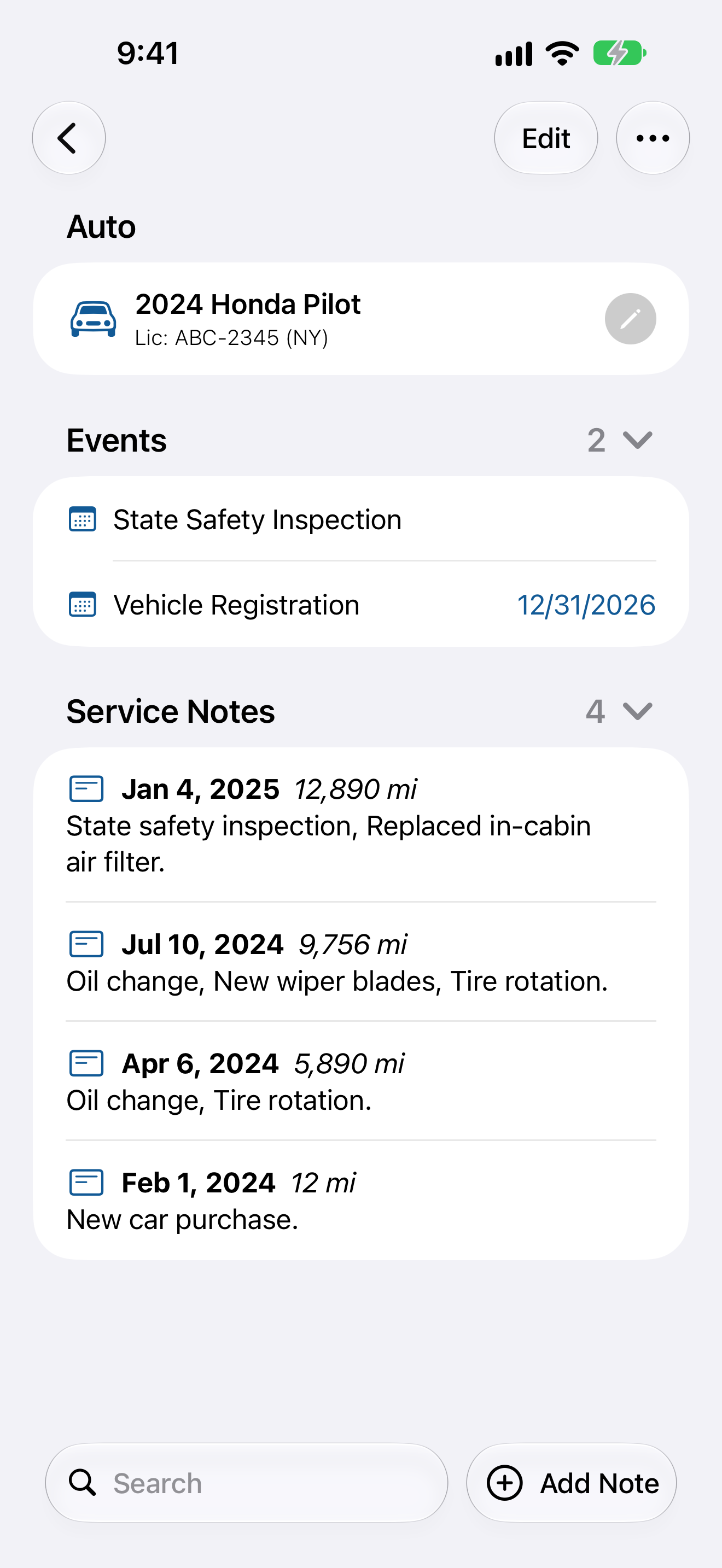
To track your lease mileage, write down the odometer reading on the day you take delivery, divide the total allowance by the number of months in the lease, and compare that monthly figure with what you actually drive, every month or so. If you are driving more than the lease allows, you find out in month eight, when there is still time to change something, rather than at turn in, when the only thing left to do is pay.
Most people do none of that. The contract sets a limit, often 12,000 miles a year, the auto goes home, and nobody looks at the number again until the dealer walks around it with a clipboard three years later. Every mile past the allowance is billed at the rate written in the contract, commonly somewhere between 10 and 30 cents, so a driver who ends up 4,000 miles over at 25 cents writes a $1,000 check on the day they hand back the keys.
Why lease mileage gets missed
- The allowance is quoted per year but billed as a total. In most contracts the miles are added up once, at the end, over the whole term. Nothing tells you that you are over until it is too late to fix.
- Driving changes after you sign. A new job, a longer commute, a summer road trip, a teenager who starts taking the auto to school. The number you picked at signing was a guess about the next three years.
- The odometer gives you a total, not a pace. 21,400 means nothing on its own. It only means something next to the date you took delivery and the reading you started from.
- The auto did not start at zero. Delivery miles and test drives are already on it, and the contract states the starting reading. Your allowance counts from that number.
None of this is hard math. It needs two readings with dates on them, and almost nobody keeps them.
Work out your monthly pace
Take the total allowance for the lease and divide it by the length in months. On a 36 month lease:
- 10,000 miles a year is 30,000 total, or about 833 miles a month.
- 12,000 miles a year is 36,000 total, or 1,000 miles a month.
- 15,000 miles a year is 45,000 total, or 1,250 miles a month.
Your allowed reading on any date is the starting reading plus that monthly figure times the months you have had the auto. Six months into a 12,000 mile lease that began at 14 miles, you should be at or under about 6,014. If the dash says 7,600, you are running about 26 percent over, with thirty months left to bring it back.
How to track lease mileage on your iPhone
Auto Care Plus is a maintenance log, and since version 1.12.0 it draws a chart of each auto’s mileage from the readings you log, with an estimate of how many miles a month you drive, which is the number a lease asks you to watch.
- Add the leased auto. Type or paste the VIN and the year, make, model, and trim fill themselves in.
- Log the reading on delivery day. Enter the odometer from the contract or the dash before you drive off the lot. Every later reading is measured against it, and it is the one reading you cannot rebuild later.
- Log the mileage whenever you see it. At a fill up, at an oil change, on the first of the month. Every service note carries the mileage with the date, and you can log a reading on its own too. The Log Mileage action works through Siri, Spotlight, and Shortcuts, so you can say the number at the pump without opening the app, as covered in How to Log Car Maintenance With Siri on Your iPhone.
- Open the mileage chart. In the auto’s ••• menu, choose Driving. The chart plots every reading you have logged, works out about how many miles a month the auto is driven, and estimates today’s odometer from that pace. Turn on Show on Auto Screen to keep it on the auto’s screen on all your devices.
- Compare the monthly figure with your pace. If it reads above 1,000 on a 12,000 mile lease, you know early, and you know by how much. The estimated odometer helps too: set it next to the allowed reading for today’s date.
- Add the lease end date as an event. Autos hold events with expiration dates for the paperwork that has nothing to do with a repair, and a lease end fits there. Turn on Allow Calendar Events and it shows up in your Apple Calendar as well, which How to Add Car Maintenance Dates to Your iPhone Calendar walks through.
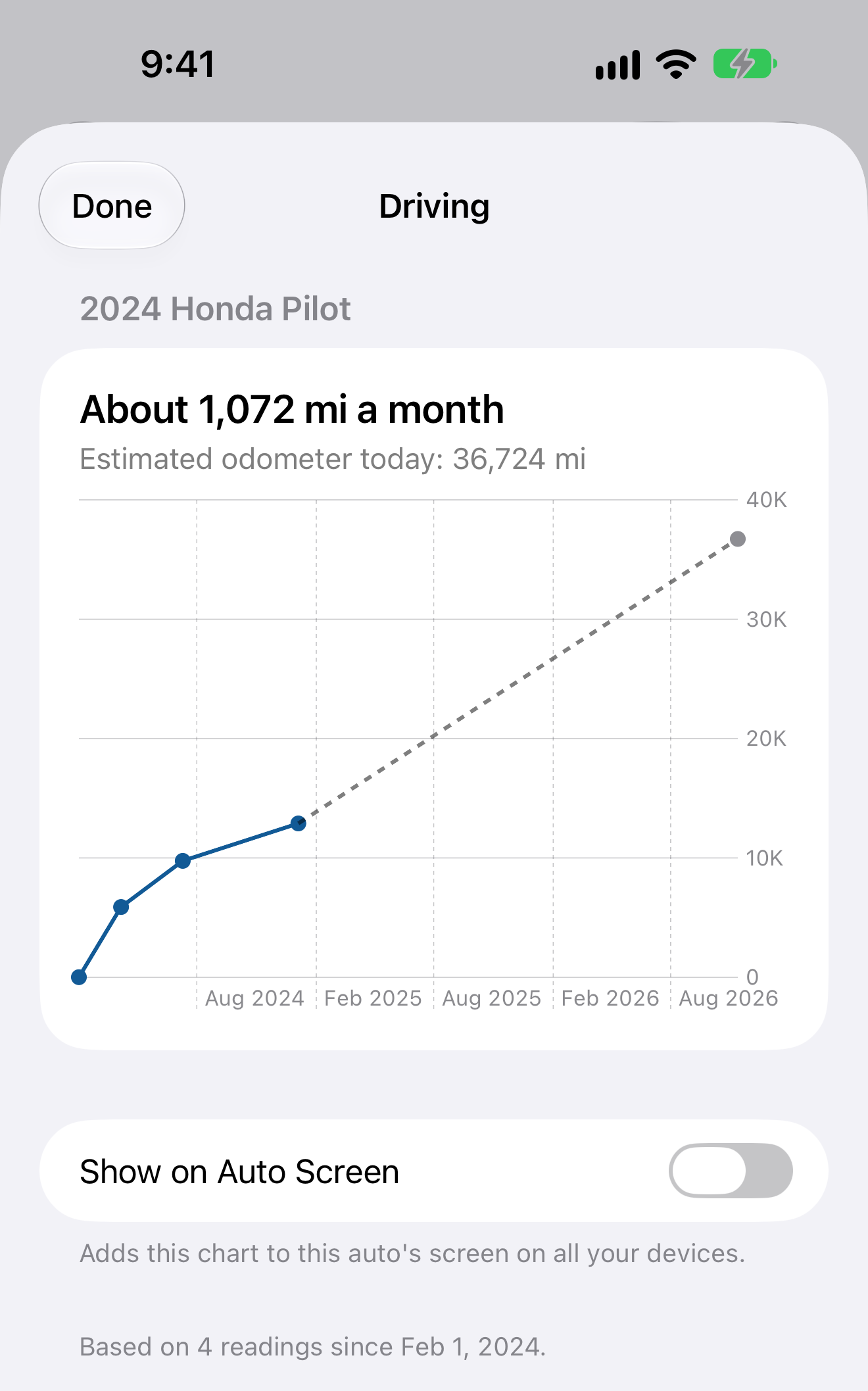
The Driving chart for a sample 2024 Honda Pilot: about 1,072 miles a month, a little over the 1,000 a month a 12,000 mile lease allows.
What the app does not do: it does not know your lease terms, it does not read the odometer by itself, and it does not warn you when you pass an allowance. You supply the readings and make the comparison, which takes a few seconds a month.
What to do if you are running over
The earlier you see it, the more choices you have. Terms vary, so ask the leasing company, but the usual options are these:
- Move the long trips to another auto in the household. If you keep more than one, each has its own readings and its own chart, as in How to Keep Maintenance Records for Multiple Cars on Your iPhone.
- Buy extra miles before the end. Some lessors sell more miles partway through the lease at a lower rate than the charge at turn in.
- Plan to buy the auto. The overage charge applies when you return it. If you buy it at the end of the lease, the miles are yours.
- Pay it and budget for it. Sometimes the charge costs less than changing how you live. Knowing the figure months ahead means it sits in the budget instead of arriving as a bill you did not expect.
Mileage is not the only thing checked at turn in
Most leases also expect the auto to be maintained on the manufacturer’s schedule, and a dated record of that work helps if a question comes up at inspection. The same readings that track your pace also date every oil change and tire rotation. How to Track Car Mileage Between Oil Changes on Your iPhone covers that side. If you wonder whether the work has to happen at the dealer, read Do I Have to Service My Car at the Dealer to Keep the Warranty?, and if you want a copy to hand over, How to Export and Back Up Your Car Maintenance Records on iPhone explains the export.
What it costs
Auto Care Plus comes with a 30 day trial, then $1.99 a month or $7.99 a year. Lifetime access is $24.99, a one time purchase with no trial. The mileage chart, unlimited autos, reminders, events, recall checks, iCloud sync, and export come with every plan.
Start on delivery day
Log the odometer the day the auto comes home and once a month after that. By the halfway point the chart shows whether you will finish under the limit, while there is still time to do something about it.
Download Auto Care Plus on the App Store
